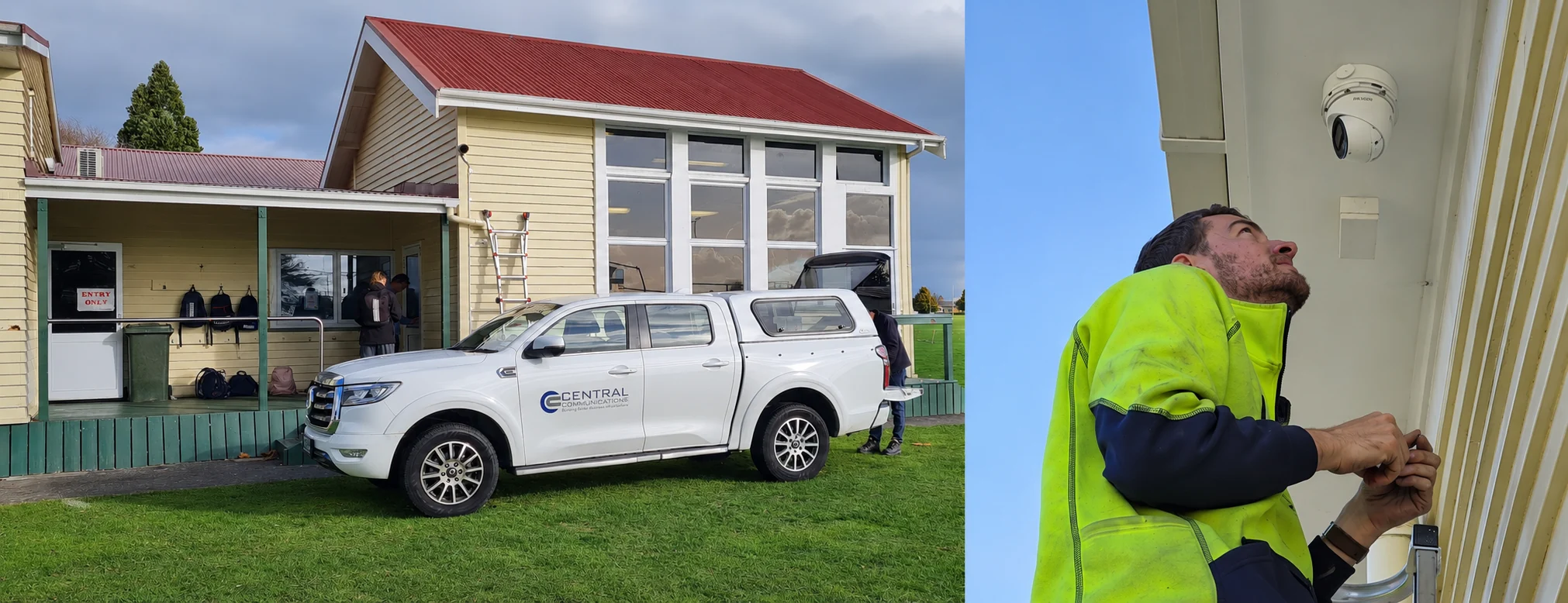
Photo montage of a Central Communications work vehicle at a school and a technician fitting a CCTV camera

Hamilton & Waikato

CCTV installers.
Clarity when it counts.

Security cameras, Nx Witness and local support. From a single entrance to a multi-site business.

PSPLA company licence 26-136711 · Design, installation & maintenance

More than a wall of camera feeds

Useful footage. A system you can work with.

Central Communications Ltd designs, installs and maintains CCTV systems for Hamilton and Waikato businesses, schools and homes. We bring the cameras, cabling, recording, remote access and ongoing support together, so you have a local team responsible for the whole installation.

A high-resolution camera is only one part of the answer. The lens, angle, lighting, network and recording settings determine whether you can actually understand what happened. We start with that question, then choose the equipment.

See the detail that matters

A wide overview and an identification view do different jobs. Plan the entrances, stock movements or activity you need to see, then check the image at the real distance and time of day.

Find the moment, not just the camera

Clear camera names, accurate time and practical playback help an authorised person investigate an incident. A useful system makes finding and exporting the relevant footage part of the design.

Keep the system maintainable

Documentation, access controls, storage checks and a support plan matter long after installation. We help you understand what is installed, who can use it and what needs attention as the site changes.

Different sites, different priorities

Where CCTV earns its place.

These are example requirements, not fixed packages or customer case studies. We scope the coverage, recording and permissions around your property and the people who use it.

Retail and customer-facing businesses

An incident at the counter or a disputed collection needs more than a vague description.

Plan views of entrances, service areas and stock movement, with appropriate privacy boundaries. Give authorised managers a practical way to find and export a relevant clip.

The benefit: A clearer record for reviewing incidents and resolving questions.

Schools and multi-building campuses

Several buildings, different staff responsibilities and busy arrival times make coverage and access important.

Design coverage around agreed security purposes, then organise cameras and permissions by responsibility. Consider retention, signage and how an authorised person will respond to a request for footage.

The benefit: Useful oversight without giving every user access to every camera.

Industrial sites and cold storage

A camera that works in an office may be unsuitable for a freezer, dusty workshop or exposed process area.

Specify cameras, cabling, mounts and enclosures for the actual environment. Test the view under working conditions, including lighting, temperature and the activity you need to observe.

The benefit: Equipment selected for the job, not just the advertised resolution.

Warehouses, yards and logistics

Goods pass through gates, loading bays and storage areas, often across several camera views.

Plan overlapping coverage of agreed movements and make timestamps, camera names and playback easy to follow. Assess night lighting and vehicle detail at the real distances involved.

The benefit: Less guesswork when tracing a delivery or investigating damage.

Branches and multi-site organisations

Managers need visibility across locations without a collection of unrelated logins and undocumented recorders.

Assess a VMS such as Nx Witness, with site-specific access, suitable connectivity and a recording plan for each location. Agree who maintains servers, backups and user accounts.

The benefit: A more consistent viewing and support workflow as the organisation grows.

Homes, rural properties and small offices

You want a useful view of arrivals, entrances or outbuildings without an unnecessarily complicated system.

Match a recorder or VMS to the property, with sensible camera placement and secure remote access. Check connectivity to detached buildings and where footage will be stored.

The benefit: A system sized to your needs, with someone local to call for help.

Nx Witness by Network Optix

A clearer way to manage cameras and investigate incidents.

Nx Witness is a video management system (VMS): software for connecting supported cameras, recording video and giving authorised people a way to view, search and export it. It runs on suitable server hardware, rather than requiring every installation to revolve around one proprietary recorder.

We recommend considering it when camera choice, day-to-day usability and future growth matter. A warehouse can organise views around its loading bays; a school can assign access by responsibility; a multi-site business can plan a consistent viewing workflow across locations.

Its appeal is the combination: flexible camera support, an approachable client and a server platform that can grow with the job. We demonstrate the functions your team will actually use before settling the design.

How Nx Witness works
Network Optix Nx Witness video management product illustration
Nx Witness by Network Optix. Capabilities depend on the edition, devices and system design.

Nx Witness features and their practical value

What each capability can do for your organisation, and what to confirm
CapabilityBusiness benefitWhat we check
Motion search, playback and bookmarksNarrow an investigation to a time, camera or area of movement, and mark important moments for follow-up.Motion and metadata must be available and configured. Demonstrate the search on your actual cameras.
Supported cameras from different manufacturersKeep suitable equipment and choose new cameras around the job instead of assuming every camera must be replaced.Verify model, firmware, codecs, audio, events and PTZ support. An ONVIF label is not a promise of every feature.
Desktop, mobile and browser accessLet authorised staff review video from an appropriate device rather than returning to a recorder screen.Confirm client functions, permissions, network access and the security of remote connections.
User permissions and video exportGive people the access they need and a defined route for sharing relevant footage.Agree who may view, administer or export, and how exported footage will be handled.
Multi-server design and camera failoverPlan for growth and allow another suitably configured server to take over camera recording after a server failure.Failover needs another server, spare capacity and camera connectivity. It is not a backup of every recording or a zero-downtime guarantee.
Recording and storage managementMatch recording schedules and storage to the footage the business needs to retain.Budget for real bitrates, usable disk capacity, retention and storage faults. Confirm results after commissioning.
APIs, events and analytics integrationsConnect supported video events and business workflows instead of treating CCTV as an isolated screen.Integration, analytics and licensing depend on the devices, software edition and additional products involved.

See Network Optix's Nx Witness overview, motion search guidance and camera failover requirements. Analytics and integrations need their own compatibility and licensing checks.

Open integration does not mean free software

Nx Witness is a commercially licensed VMS. Its desktop client is open source, and APIs and development tools support integration, but the complete recording system is not a free open-source NVR. Licensing options vary by edition and region; we confirm the applicable licences, services and ongoing costs in your quote.

Remote access is also different from cloud recording. Connecting through Nx Cloud does not, by itself, mean your video archive is backed up in the cloud.

Choose around the job

Why choose Nx Witness over another CCTV system?

For a growing organisation with a mix of cameras and people who need to investigate footage, Nx Witness is a strong candidate. These are our practical trade-offs, not a claim that one platform is best for every site.

Compared with a basic NVR appliance

Where Nx Witness can win: a flexible server-based design, supported cameras from multiple manufacturers and a consistent investigation workflow can be valuable as your site grows beyond a straightforward recorder installation. You can assess server and storage capacity around the workload.

What to weigh up: a dedicated NVR may be simpler and more economical for a small site. Nx Witness introduces software licensing and server maintenance. Check whether you need that flexibility before paying for it.

Compared with Milestone XProtect

Where Nx Witness can win: when the priority is straightforward daily viewing, search and export, we would put Nx Witness in front of your operators and test how quickly they can complete those tasks. Its workflow and the design we can support locally may be a better fit for your team.

What to weigh up: XProtect is also an open-platform VMS with scalable architecture, integrations and failover options. Nx Witness does not have a monopoly on those features. Existing standards, specialist integrations, operator preference and the required edition should drive the choice.

Compared with UniFi Protect

Where Nx Witness can win: organisations that want to choose server hardware, build a multi-server VMS and evaluate a mixed camera estate may prefer its deployment flexibility. It is worth considering when video management needs to extend beyond a single appliance ecosystem.

What to weigh up: UniFi Protect can be attractive when the organisation already uses UniFi and wants an integrated setup. It supports third-party ONVIF cameras too, although feature support varies. Test the exact cameras and workflows on either platform rather than assuming a brand label settles compatibility.

Our recommendation: compare a complete working design, not a licence price or a feature count. Include cameras, server hardware, usable storage, access, migration, training and ongoing support. We can assess the equipment you already own before proposing a replacement.

Built from hands-on CCTV work

Better tools for commissioning, maintenance and handover.

Central Communications' Paul Willard created SADPTools and NX Camera Info to help technicians make sense of camera installations. They tackle different parts of the job: working with reachable devices, and understanding information saved in an Nx Witness database.

For a customer, the benefit is practical: clearer site records, better-informed troubleshooting and less dependence on someone remembering how a system was installed years ago. These are independent tools, not official Hikvision or Network Optix applications.

Discover · Commission · Document

SADPTools: turn camera discovery into useful site knowledge.

A free desktop toolkit for supported Hikvision SADP discovery and configuration, with ONVIF and ISAPI tools where devices support them. Windows, Linux and macOS packages let technicians choose the appropriate platform for the job.

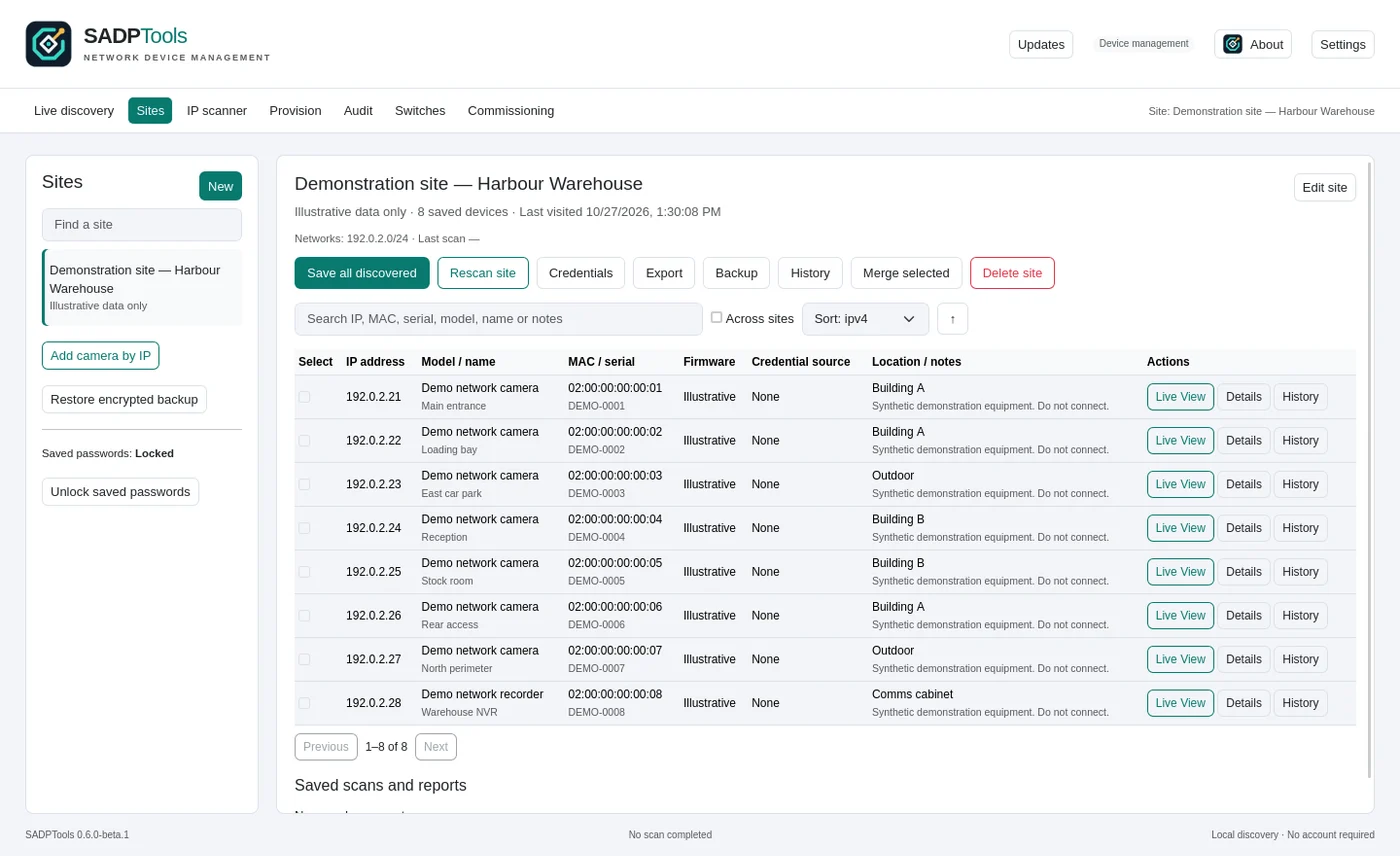
SADPTools showing a demonstration site's device inventory, camera details and diagnostic controls
SADPTools with demonstration inventory. Available functions depend on the device, firmware and network.

Make commissioning repeatable

Discover supported devices, inspect identity and network information, and carry out supported configuration work in one place. Saved sites and installation records help turn a list of addresses into an understandable handover.

Investigate with evidence

Network probes, supported Live View and diagnostic information help a technician narrow down connectivity or configuration problems. That gives a maintenance visit a better starting point than guessing from an offline camera icon.

Carry the knowledge forward

Keep inventory, notes and history together, protect saved credentials and transfer site records in encrypted form. Reports and imports from NX Camera Info help reduce repeated data entry when taking over an existing installation.

Know the boundary: SADP discovery normally stays on the local network segment; routed sites need appropriate access and supported checks. The app is not a video recorder, a universal recovery tool or a substitute for checking the physical installation.

Explore SADPTools features and downloads

Understand · Recover context · Plan

NX Camera Info: make an Nx Witness backup useful before you reconnect.

A saved database can hold valuable information when a site changes hands or a server is unavailable. NX Camera Info reads supported Nx Witness databases and backups so you can inspect that information without a running Nx server for a local file.

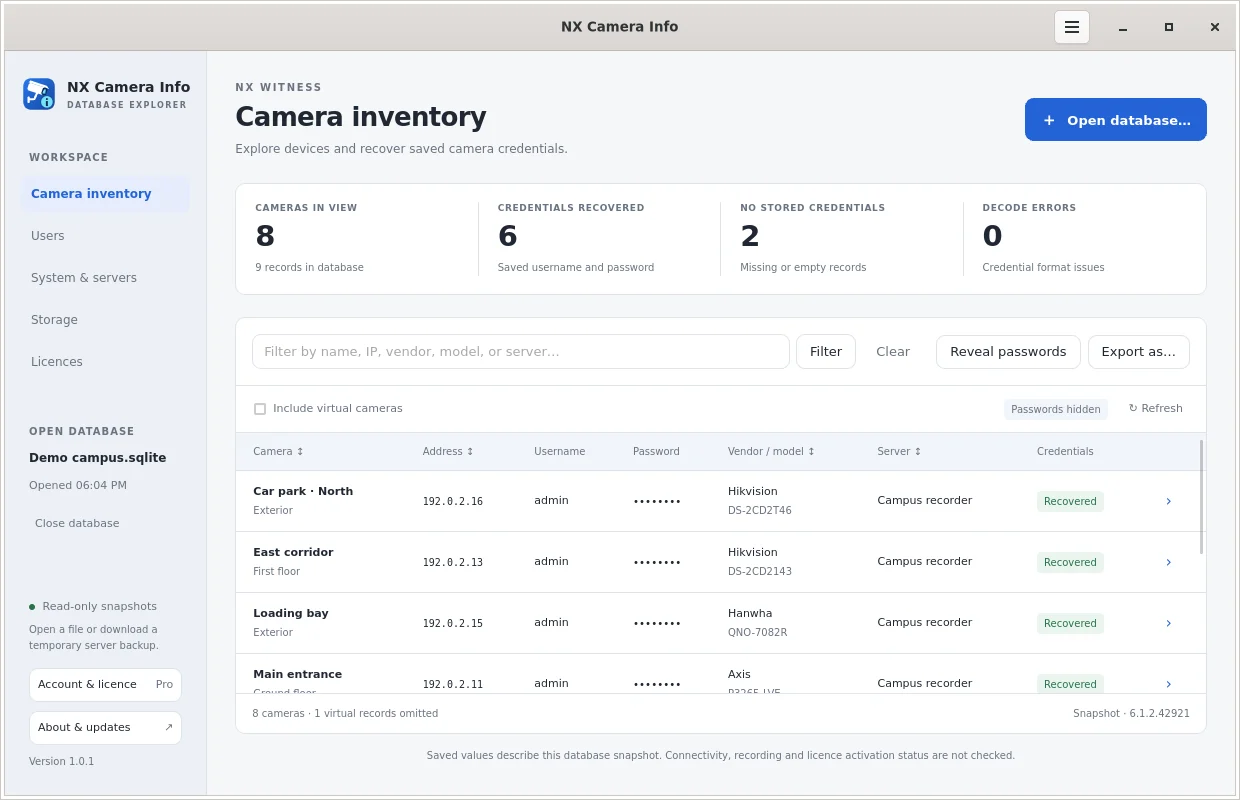
NX Camera Info Pro displaying a demonstration camera inventory with masked passwords
NX Camera Info Pro with demonstration data. A saved database is a snapshot, not a live health check.

Find out what was installed

The free edition browses, filters and sorts a local camera inventory without an account. That can establish a starting list of camera names and addresses before planning a site visit or replacement server.

Recover authorised site knowledge

Pro adds supported stored camera credential recovery, CSV and JSON exports, and reports covering users, servers, system settings, storage and licences. It also supports authorised server and Nx Cloud backup connections.

Plan a better handover

Use the reports to identify what needs verification, prepare migration records and import compatible JSON into SADPTools. Inspecting a local database is read-only, helping preserve the original file while you document the site.

Know the boundary: saved camera credentials may be old or absent. The app does not recover recorded video or Nx user passwords, reset cameras, restore a server or bypass access controls. Pro functions require a licence; connection features require the appropriate permissions.

Explore NX Camera Info Free and Pro

One example: taking over a poorly documented site

Start with an authorised Nx Witness backup. Use NX Camera Info to understand the saved inventory and, with Pro, export the relevant records. Import supported JSON into SADPTools, then check the reachable devices and reconcile those records with the actual installation.

The benefit: a more informed site survey and a usable starting point for maintenance or migration. A backup may be out of date, so the final design still depends on live checks. Databases, credentials and reports are sensitive; keep them access-controlled and share them only with authorised people.

From first survey to ongoing support

A CCTV system is only as good as its installation.

We scope new systems and review existing installations. Camera brands we work with include Hikvision, Dahua, Uniview, Mobotix and UniFi. The selection follows the site requirements, not the other way around.

Design the views and infrastructure

Agree the purpose of each camera, coverage gaps, lighting and privacy boundaries. Assess cable routes, power, switching and links between buildings, then size the recorder or VMS and storage around the required footage.

Commission and hand over

Check images, time settings, recording and playback. Set up authorised access, document the installation and show the people responsible how to find and export an incident. Test remote viewing where it will actually be used.

Maintain what you rely on

Review camera views, available recording history, storage condition and user access. Plan updates and recovery arrangements, and revisit the design when new buildings, stock layouts or responsibilities change the job.

Hikvision Dahua Uniview Mobotix UniFi

From our project archive

Freezer CCTV: the environment changes the specification.

At a local meat works, we upgraded ageing analogue cameras to IP cameras in a freezer reaching -40°C. The project used cameras rated to -40°C and cable rated to -50°C.

The lesson for an industrial installation is simple: camera resolution alone cannot tell you whether the equipment is suitable. Temperature, cabling and the working environment belong in the design from the start.

Read about the freezer CCTV installation

Need to connect a remote building or improve the network underneath your cameras? We also handle structured data cabling and fibre and wireless networking and links.

Licensed locally. Accountable locally.

PSPLA licensed CCTV installers in Hamilton.

Central Communications Ltd holds PSPLA company licence 26-136711, covering Security Consultant and Security Technician work. Our NZBN is 9429050077809.

We supply, install, configure and maintain CCTV systems across Hamilton and the wider Waikato. You can view our company certificate here and read the Ministry of Justice guidance on work covered by security licensing.

A licence is one part of choosing an installer. Ask about the proposed camera views, recording, training, documentation and support as well.

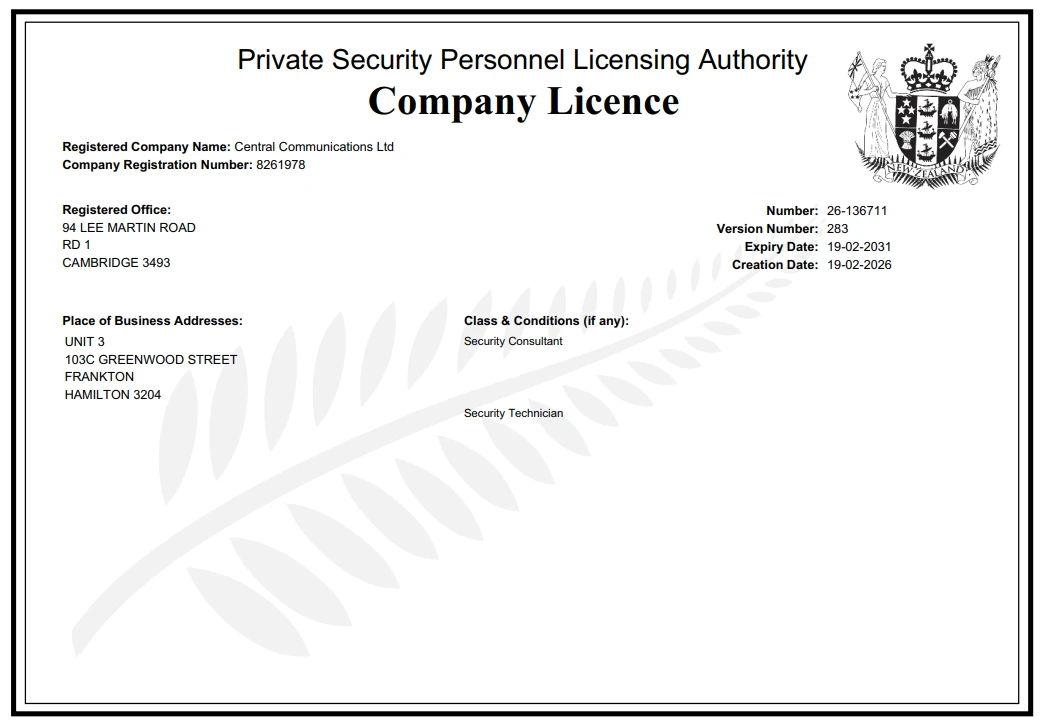
PSPLA licensed CCTV installer in Hamilton: Central Communications Ltd company licence 26-136711
Company licence certificate. Open full size.

Privacy belongs in the design

Decide why you need CCTV, limit views to that purpose and make recording clear to the people affected. Restrict access, set an appropriate retention policy and consider how you will respond to footage requests. Audio needs particular care; it should not be enabled just because a camera has a microphone.

We help with technical settings, but your organisation remains responsible for its privacy obligations. The New Zealand Privacy Commissioner's CCTV guidance is a useful starting point.

Customers across the Waikato

Installation is the beginning. Support matters too.

Jordon and Peter describe their CCTV experience; TeTauru reflects on our wider support for the school. Their words about working with Central Communications.

CCL has played a big role since before the school officially opened in 2017. Central Communications has been there for us every step of the way. I consider Central Communications still very much an integral part of our school. Their support and service has been invaluable and professional.

TeTauru PihamaTeTauru PihamaTe Kōpuku High School

Central Communications provided our business with a comprehensive CCTV system that has greatly enhanced our security and surveillance capabilities. Their team was knowledgeable, professional, and thorough throughout the entire installation process. They took the time to understand our needs and provided tailored recommendations that suited our specific requirements.

Jordon ElliottJordon ElliottTe Rūnanga o Kirikiriroa

I have been dealing with Paul Willard who has been managing and installing our security cameras here at Matamata College since he took over Central Communications in 2021. During this time Paul has always acted in a professional manner, keeping our cameras functioning well and ensuring security of our camera feed. Paul has provide expert advice and guidance.

Peter BillinghamPeter BillinghamMatamata College

Before you choose

CCTV questions, answered.

Installation, cameras, Nx Witness, maintenance tools and the practical details behind a useful security system.

Ask us about your site
Are you PSPLA licensed CCTV installers in Hamilton?

Yes. Central Communications Ltd holds PSPLA company licence 26-136711, covering Security Consultant and Security Technician work. Our NZBN is 9429050077809. We supply, install and maintain CCTV systems in Hamilton and across the Waikato. The company licence certificate is available on this page.

Do you install CCTV for homes as well as businesses?

Yes. We work with homes, shops, offices, schools, warehouses, industrial sites and multi-site organisations. The design starts with what you need to see, the environment and who should have access. A small property may need a straightforward recorder; a larger site may benefit from a video management system such as Nx Witness.

How much does a CCTV installation cost?

The price depends on camera positions and types, cable routes, network work, recording capacity, software licensing, access requirements and ongoing support. We scope those items together rather than quoting on camera count alone. Tell us about your site, any existing equipment and what you need the footage to help you understand.

What is the difference between an NVR and a VMS?

An NVR is a network video recorder, commonly supplied as a dedicated appliance. A VMS is video management software that manages cameras, recording, playback and users on suitable server hardware. Their functions overlap. We choose between them based on your camera requirements, investigation workflow, integrations, growth and support needs.

Why do you recommend Nx Witness?

Nx Witness is worth considering when you need supported cameras from different manufacturers, practical search and playback, remote access and room to expand. We assess it around the people who will use the footage, not just its feature list. A simpler recorder may still be the right choice for a small installation.

Can Nx Witness use our existing cameras?

Often, but we check each model and firmware version before recommending reuse. Video streaming, motion events, audio and PTZ control may have different levels of support. We test the required functions and assess whether the camera still produces useful images at the distance and lighting conditions of your site.

Is Nx Witness free or open source?

Nx Witness is a commercially licensed video management system, not a free open-source NVR. Its desktop client is open source, and the platform offers APIs and development tools. Licensing options and included features vary by edition and region. We confirm the applicable recording licences or subscription services in your quote.

Can I view CCTV on my phone or from another site?

Yes, with a compatible system, suitable connectivity and authorised access. Nx Witness offers mobile, desktop and browser clients. We configure access around your users and responsibilities, and test the connection from the locations that matter. Remote viewing still depends on the relevant internet connection, server availability and permissions.

How long will my CCTV recordings be kept?

Retention depends on usable storage, camera bitrates, recording schedules and system settings. We plan a retention period around your purpose and requirements, then check actual performance after installation. More megapixels do not automatically mean more useful evidence, and a disk size on its own does not establish a reliable number of recording days.

Will CCTV keep recording if the internet goes down?

A locally recording system can continue while its cameras, local network, power and recorder remain available. Remote viewing may stop until connectivity returns. Cloud-dependent services have different requirements. We identify those dependencies and discuss backup power, connectivity and recording arrangements during the design.

Does Nx Witness failover protect all of my footage?

No. Camera failover can move recording to another configured server when the original server becomes unavailable, provided the second server has capacity and can reach the cameras. It does not automatically duplicate the entire existing archive or protect against every network, power or storage failure. Archive backup and recovery need a separate plan.

What is SADPTools and how does it help with CCTV?

SADPTools is a free, independent desktop toolkit created by Paul Willard for CCTV discovery, supported device configuration and site documentation. It helps a technician identify equipment, investigate connectivity and keep installation records together. It is not an official Hikvision application, and discovery, configuration and diagnostic support vary by device, firmware and network access.

What does NX Camera Info do?

NX Camera Info reads saved camera and system information from a supported Nx Witness database or backup. Free mode lets you browse a local camera inventory. Pro adds supported stored camera credential recovery, exports and wider system reports, plus authorised server and Nx Cloud backup connections. It describes a saved snapshot, not live camera health.

Can these tools recover a lost camera password or missing video?

NX Camera Info Pro can reveal supported camera credentials that are present in an authorised backup, but saved passwords may be old or missing. It does not recover Nx user account passwords or recorded video. SADPTools offers supported, authorised recovery workflows for compatible devices. Neither tool bypasses permissions or guarantees access to every camera.

Can you maintain or upgrade an existing CCTV installation?

Yes. We can assess camera views, cabling, network connectivity, recording, storage, permissions and the available documentation. We identify what can be retained and what needs attention before proposing an upgrade. Where a supported Nx backup is available, NX Camera Info can assist with inventory and handover, alongside checks on the actual system.

What should a business consider about CCTV privacy?

Define a clear purpose, choose appropriate views, tell people about recording and restrict who can access footage. Retention and any audio recording need particular care; audio should not be enabled simply because a camera supports it. We can help with technical settings, while your organisation remains responsible for its privacy obligations and policies.
Your site. Your priorities.

What do you need to see more clearly?

Tell us about your property, the equipment already there and the questions you need your footage to answer. We'll help scope a practical CCTV system and the support behind it.

Talk to Central Communications